
Managing Your Subscription
Everything about your plan and payment lives in one place. This page shows you how to change plans, update your card, cancel, and what our refund policy actually says.
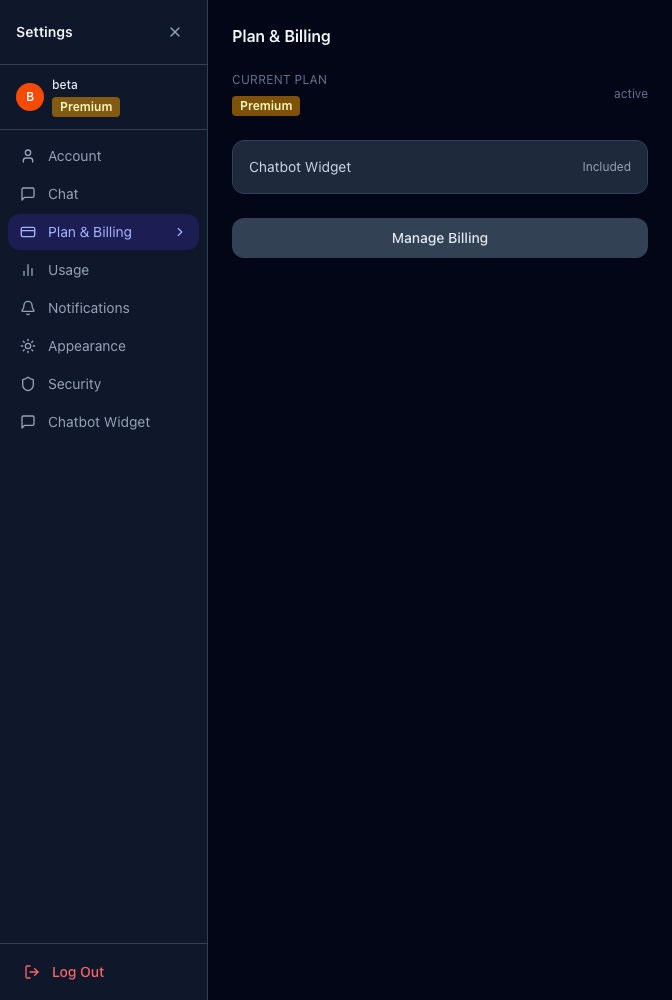
#Finding your billing settings
In your dashboard, open Settings, then the Plan & Billing tab. You’ll see your current plan and the buttons to change it.
#Upgrading your plan
Click Upgrade. This opens our secure billing portal (handled by Stripe, the same payment system used by millions of businesses). Pick your new plan and confirm. Your new features turn on immediately, and you’re only charged the prorated difference for the rest of your current month.
#Downgrading or changing your card
The same Manage Billing button opens the billing portal, where you can switch to a lower plan or update the card on file. A downgrade takes effect at the end of your current billing period, so you keep your current features until then.
#Cancelling
You can cancel from Manage Billing too.
- Monthly plans — cancel anytime. Your access continues to the end of the month you’ve already paid for, then stops.
- Annual plans — these are a 12-month commitment. You can turn off auto-renewal anytime, and your access continues to the end of your paid term.
#Our refund policy
Here’s the part people most want clear:
- Monthly plans — 30-day money-back. If you change your mind within 30 days of your first charge, email [email protected] and we’ll refund you in full, no reason needed. After 30 days, we don’t refund partial months on a mid-cycle cancellation.
- Annual plans — 30-day money-back, with one condition. You can get a full refund within 30 days of your first charge only if we haven’t yet delivered your rebuilt site. Once we’ve delivered the rebuild (we publish it and tell you it’s ready for review), the annual fee is non-refundable, including unused months.
The full, exact terms — including how “delivered” is defined and the review window on your rebuild — are in our Terms of Service.
#What happens to my site if I cancel?
Your site doesn’t vanish the moment you cancel. There’s a wind-down: your service continues through the period you’ve paid for, and there’s a grace window after that before anything is taken offline. If you cancel by accident or change your mind, reach out to [email protected] and we’ll help you pick back up.
#If your plan is managed for you
Some customers are billed directly by our team on a custom arrangement rather than through self-serve checkout. If that’s you, your Plan & Billing tab will say your plan is managed — to change it, contact your account manager or email [email protected].